Start with the scene and subject, then describe one action and one camera direction. Light and style can help, but an adjective list is less useful than a clear shot.
A scene in words. A shot you can review.
Text to Video builds a new scene from your brief. Name the place, the main subject and what changes during one shot, then choose the model and available output settings above. The lighthouse example below is an actual MiniMax H3 run requested at 5 seconds and 768p; the tower becomes larger as the shot moves closer.
Give Text to Video one clear shot
Use the scene, movement and camera as separate decisions. The brief can be specific without giving the model several competing shots.
- 01
Establish the opening frame
Start with a concrete subject and location, such as a lighthouse on a rocky coast at dawn.
- 02
Direct the change
Give the environment or subject one action, then state one camera instruction. Add light and texture only when they help define the shot.
- 03
Review the current setup
Select an available model, duration and resolution. Sign in and check the Credit estimate before submitting.
One real case and two prompt revisions
The first brief is the actual lighthouse input. The next two are suggested revisions using its poster for reference; they have not been generated and are not additional output claims.
Browse the input and prompt examples.
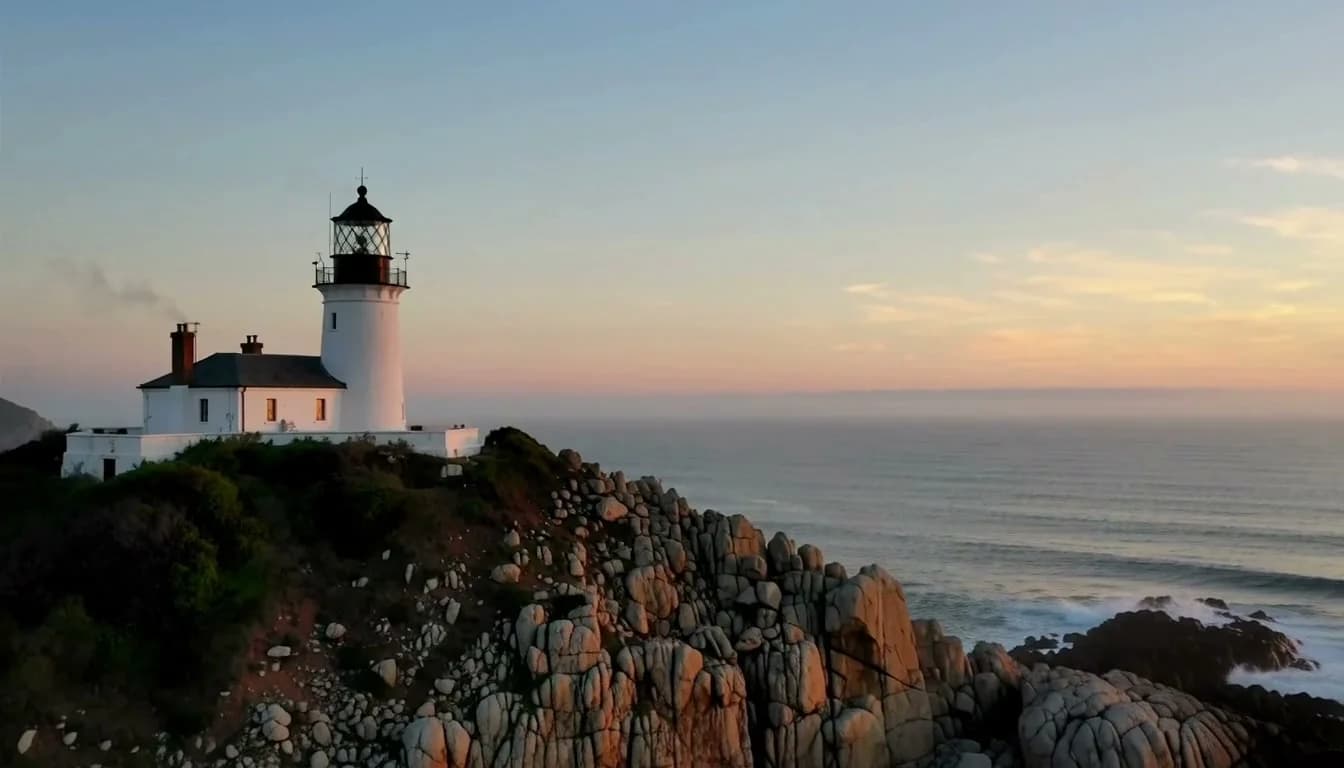
Recorded lighthouse brief
PromptA cinematic coastal lighthouse on a rugged sea cliff at dawn. Pale ocean mist drifts slowly between the rocks while gentle waves roll below. The camera makes a smooth, slow push toward the lighthouse, keeping its shape and position stable. Soft blue and warm amber light, natural textures, one continuous shot, no people, no text, subtle ocean ambience.
Observed: the lighthouse and waves are visible, and the tower grows larger as the camera approaches.
Test a locked frame
PromptA lighthouse on a rocky sea cliff at dawn. The camera remains locked while mist drifts across the rocks and gentle waves move below. One continuous shot.
Compare camera stability while keeping the subject and atmosphere similar. This revision has not been generated.
Test the pacing
PromptA lighthouse on a rocky sea cliff at dawn. Very slowly move the camera toward the tower, gentle waves below, pale mist, one continuous shot.
Reduce the requested camera pace before asking for more actions. This revision has not been generated.
Choose settings around the scene
The selected model determines the duration, resolution, shape and controls. Match them to the shot you want to evaluate.
| Goal | Focus on | Why it helps |
|---|---|---|
| Check the main action | A shorter available duration | A compact test helps you see whether the intended movement reads clearly. |
| Frame the subject | The available aspect-ratio control | Choose the frame for the subject and destination; supported shapes differ by model. |
| Inspect output detail | The selected resolution | Higher resolution can change access and Credit requirements; compare it with the task. |
| Plan another attempt | The live model and Credit estimate | Each revision is a new request. Review the full setup before submitting. |
Make the next attempt easier to evaluate
Change one decision at a time and compare what actually changed in the output.
- Several movements compete
- Keep one main action. Test the camera move separately before adding more movement.
- The composition changes too much
- Reduce the requested motion and state which key details should remain consistent.
- The result misses the intended focus
- Name the focal object and starting composition directly, then remove unrelated details.
- The control I expected is missing
- Check the selected model and mode. Use only the settings currently exposed in the studio.
Text to Video questions
Practical answers about live settings, Credits, account access, and consent-first creation.
Text to Video starts from a written brief. If you already have a composition you want to animate, use Image to Video instead.
No. The case documents one actual run, and outputs can vary. Current model behavior and settings also affect the result.
Choose the model and complete setup in the studio. The estimate reflects the current selection, and some settings require a subscription. Review the displayed requirement before submitting each attempt.
The public studio and this guide are available while signed out. To submit a generation, sign in and make sure the account has enough available Credits. Introductory rewards depend on the account’s eligibility.
Use ideas and sources you are authorized to process for the intended purpose. Every depicted person must clearly be an adult and give the required informed consent. Review the Terms and Content Guidelines before uploading or sharing.
Return to your video setup
Use your own authorized input, review the live configuration and Credits, then submit when ready.